Build vs. Buy: Should You Automate AR or Hire More Staff to Manage Accounts Receivable
Hiring a collector adds capacity one salary at a time. AR automation adds coverage without headcount. The real cost math for deciding which your team needs.

Sia Ghazvinian
Co-Founder & CEO

Table of contents
Share
Many service-based small and mid-sized businesses reach a similar crossroads as they grow: accounts receivable (AR) is becoming overwhelming, and something has to give. Invoices are piling up. Follow-ups happen late or irregularly. Your team is stretched thin, and cash flow is tighter than it should be.
The instinct for some leaders is to hire more staff. After all, if AR work is overwhelming, more hands should help, right? But another option is gaining traction: AR automation. With advances in cloud-based software and AI-powered workflows, automation can handle repetitive tasks like sending reminders, tracking responses, and even making collection calls.
This article helps you decide between building a larger AR team, buying an automation platform, or some combination of both. You will learn the key differences in cost, efficiency, scalability, and long-term impact so you can make a decision that fits your business.
For most invoice-heavy SMBs, AR automation outperforms hiring another collector on cost and coverage: a US bill and account collector earns a median of $46,040 a year before benefits, covers accounts only during working hours, and works a prioritized slice of the ledger, while an autonomous AI agent works 100% of overdue accounts on a daily cadence. Hiring wins when accounts genuinely need human judgment, which in practice is about 14% of collections activity.
Why This Decision Matters

Accounts receivable is not just a back-office function. It affects cash flow, customer relationships, and operational efficiency. Slow collections raise your days sales outstanding (DSO), limit your working capital, and make it harder to invest in growth.
If your business produces hundreds to thousands of invoices monthly, relying solely on headcount can become expensive and error-prone. And manual follow-ups are often inconsistent, which leads to late payments and frustrated customers. A study of billing practices shows that inconsistent outreach and unclear invoice communication are among the top challenges businesses face in order-to-cash cycles.
Before choosing, it’s important to compare the real costs and benefits of hiring staff versus adopting automation.
What Hiring More AR Staff Looks Like

Expanding your AR team can feel like a natural response when manual work piles up. You get more capacity, and you can keep everything in-house where your team understands the business and customer context.
Benefits of Hiring AR Staff
1. Human judgment and relationship management
People are good at nuanced conversations, negotiating payment plans, understanding disputes, and adjusting tone based on context.
2. Flexibility with exceptions
When a situation falls outside normal patterns, humans adapt. That makes them valuable for clients who need customized handling.
3. Existing systems stay unchanged
No new software, no integration headaches, and no tech learning curve for people who are already comfortable with your accounting platforms.
Challenges of Hiring
1. Higher ongoing costs
Hiring staff means payroll, benefits, training, equipment, and overhead. A full-time AR specialist in the United States earns a median salary over US $45,000 per year, before benefits and taxes. That cost rises quickly when you add more people.
2. Inconsistent output
Humans get tired, overwhelmed, and make mistakes. When reminders slip or data entry is inaccurate, follow-up cadence breaks, and invoices get delayed.
3. Scalability issues
As invoicing volume grows, you may need more staff. Every 500 to 1,000 additional invoices might require a new full-time hire, which adds complexity and costs.
4. Training and turnover
New staff require time to become productive. Turnover means repeated training cycles, which slows consistency.
What Building AR Automation Looks Like

Automating AR shifts repetitive, predictable tasks from people to systems. Modern solutions can send reminders, follow-up emails, and even make calls using AI agents while logging responses in your AR system.
Benefits of Automation
1. Consistency and reliability
Automated systems work 24/7 without getting tired. Reminders go out on schedule. Follow-ups escalate according to rules you define.
2. Lower incremental cost
Automation solutions are typically priced as subscriptions or usage-based services. They do not require salaries, benefits, or office space, and many costs are predictable month to month.
3. Faster cash flow
Software that sends timely reminders with clear pay links, tracks engagement, and follows up increases the likelihood of getting paid on time. When every invoice is treated consistently, days sales outstanding tends to improve.
4. Scalability without headcount growth
As invoice volume increases, automation handles the load without adding staff, making it a future-proof choice for many SMBs.
5. Data and insights
Automated platforms provide real-time tracking, dashboards, and analytics. You see trends in late payments, customer response patterns, and bottlenecks you can address.
Challenges of Automation
1. Upfront setup and change management
Implementing a new platform requires setup, integration with existing systems, and some training for your team.
2. Handling complex exceptions
Not every scenario can be fully automated. Dispute resolution, creative payment arrangements, or nuanced negotiations may still need human touch.
3. Technology costs
Subscription fees and potential professional services or integration costs represent an investment, though they are usually lower over time compared to expanding staff.
Direct Cost Comparison: Headcount vs Automation
To make an apples-to-apples comparison, consider the total cost of hiring one AR specialist versus the cost of a typical AR automation platform.
Hiring One AR Staff Member (Annual)
Salary: US $45,000+
Benefits and payroll tax: US $10,000+
Training and productivity ramp: variable
Total first year cost: ~US $60,000+
AR Automation Platform (Annual)
Platform subscription: US $10,000-$30,000 (varies by vendor and volume)
Integration and setup: one-time cost depending on systems
Total first year cost: ~US $12,000-$40,000
Even at the high end, automation solutions often cost significantly less than a full-time employee when you account for salary, benefits, and overhead.
But cost is not the only measure. Output matters: automation handles repetitive tasks at scale, while humans handle exceptions and relationship work.
Efficiency and Productivity Trade-Offs
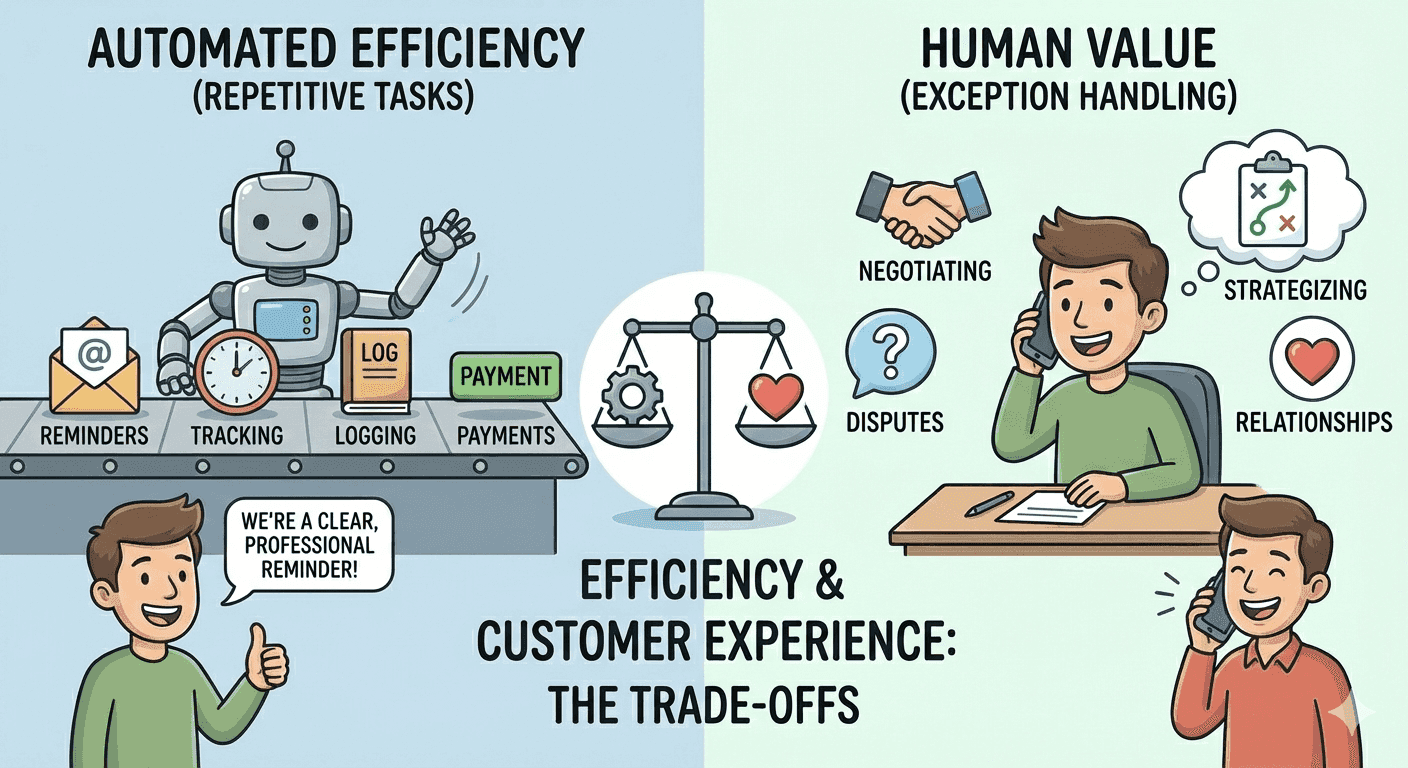
When comparing build vs. buy, think about what tasks truly require human involvement and what tasks are repetitive by nature.
Repetitive Tasks Best Suited for Automation
Sending recurring reminders
Tracking responses and outstanding balances
Logging communication history
Flagging invoices based on age or missed payment windows
Embedding pay-by links and processing online payments
Human Tasks That Still Add Value
Negotiating unique payment terms
Handling complex billing disputes
Strategizing collections based on customer relationships
High-touch outreach in delicate situations
In most organizations, the combination of automated routine work plus human exception handling results in the best mix of efficiency and effectiveness.
Impact on Customer Experience
Accounts receivable is part of your customer’s experience with your business. Inconsistent or delayed follow-ups feel unprofessional and can strain client relationships.
Automation improves customer experience by:
Sending reminders consistently and professionally
Including clear pay-by links to reduce friction
Tracking communication so customers don’t receive duplicate or conflicting notices
Human outreach shines when:
A customer disputes charges and needs personalized explanations
Your team builds goodwill with VIP clients through tailored conversations
Balancing automation with thoughtful human contact ensures that collections workflows are both efficient and respectful.
Scalability: Handling Growth Without Disruption
For businesses that produce hundreds or thousands of invoices each month, such as home services, medical clinics, and professional services firms, scalability is key.
With manual AR, growth means more people, more training, and more overhead. With automation, the system scales with your business:
More invoices do not necessitate more salaries
Communication rules apply uniformly across volume
Analytics help identify trends before they become problems
For many SMBs, automation provides the foundation to manage growth without breaking processes.
When Hybrid Makes Sense
The decision doesn’t have to be all-or-nothing. Many growth-stage firms adopt automation for routine work and maintain a small AR team focused on exceptions and relationship management.
A hybrid approach can look like:
Automation handles 80%+ of routine reminders and messaging
AR specialists focus on high-value accounts and dispute resolution
Data from automation informs human decisions
Staff are freed from repetitive tasks and can work strategically
This model often yields the strongest outcomes in both efficiency and customer satisfaction.
Choosing Automation: What to Look For
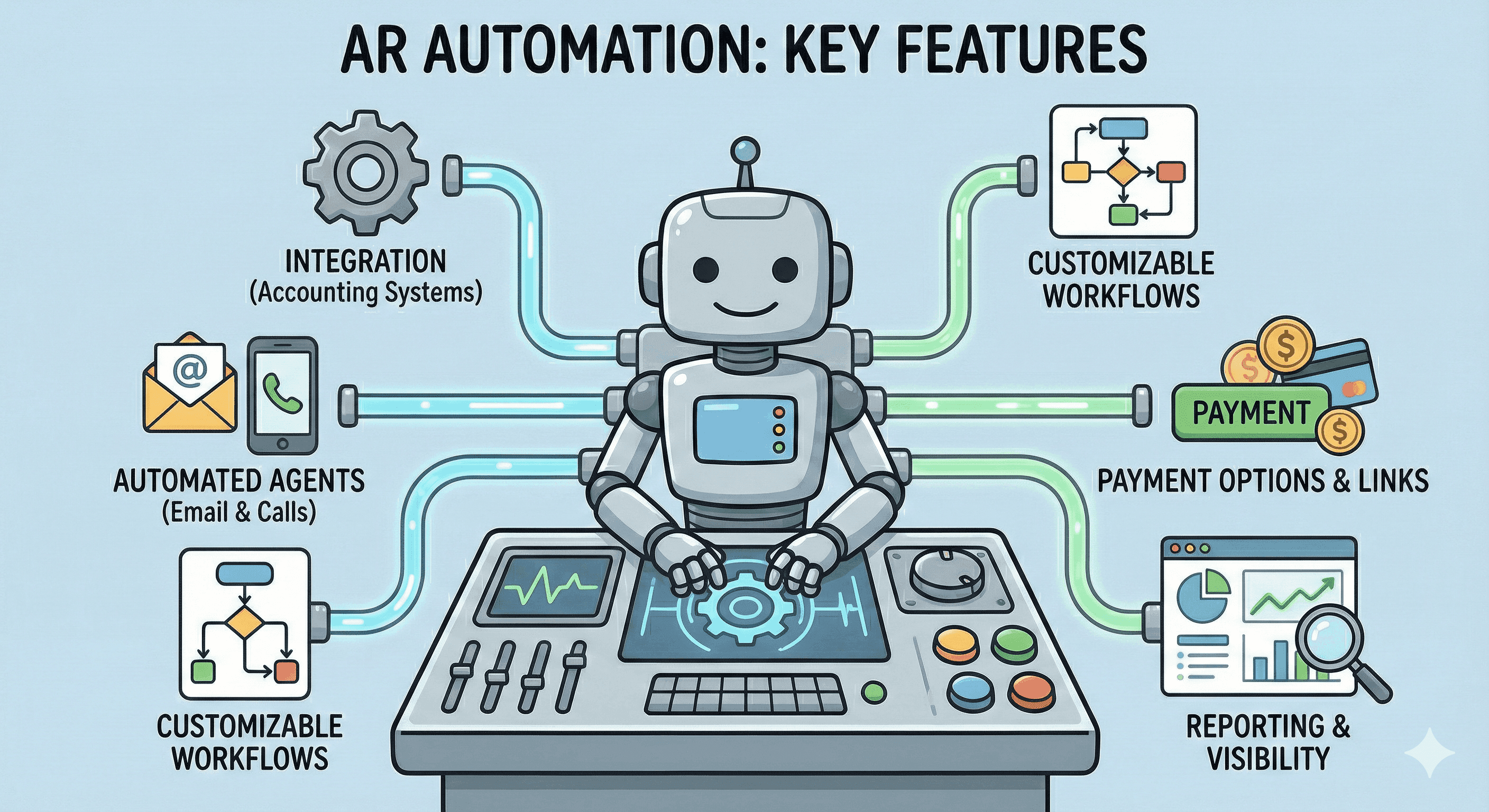
If you lean toward automation (or a hybrid), consider these key features when evaluating solutions:
1. Integration with your accounting systems
Automated AR works best when it connects to your general ledger, invoicing, and payment platforms so data flows seamlessly.
2. Automated email and call agents
Look for tools that can send reminders, follow up on overdue invoices, and even place calls using AI agents based on rules you define.
3. Customizable workflows
Not all businesses have the same terms or communication rhythm. Ability to tailor schedules and messaging is crucial.
4. Payment options and pay-by links
Platforms that embed payment options directly in reminders reduce friction for customers.
5. Reporting and visibility
Dashboards and actionable insights help you understand trends and improve terms over time.
One platform that meets these criteria is Abivo (abivo.ai), an AI-powered AR automation solution built for service-based SMBs and startups. Abivo integrates directly with systems like QuickBooks, NetSuite, FreshBooks, Sage Invoicing, Microsoft Dynamics, Xero, Stripe, Square Invoices, SAP Business One / Ariba, Jobber, ServiceTitan, BuildOps, and Bill.com, helping businesses automate reminders and collections workflows while keeping financial data in sync.
With automated email and AI calling agents, customizable follow-up cadences, and real-time insights into receivables, Abivo reduces manual work and improves the likelihood of getting paid faster. Most importantly, automation frees your team to focus on exceptions and high-value customer interactions.
Practical Takeaways
Cost wise, automation typically costs less than hiring additional AR staff when you compare total ownership.
Efficiency gains come from handling repetitive tasks automatically, reducing manual errors and delays.
Human oversight remains important for relationship management, disputes, and strategic collections.
Scalability favors automation when invoice volume grows.
A hybrid model often delivers the best balance of automation and human expertise.
Deciding whether to build an internal team or buy automation is not just about cost. It is about how you want your business to grow, how you want customers to experience billing, and how you want your team to spend their time. When you automate routine work and empower humans to focus on nuanced tasks, you increase efficiency, lower DSO, and create a more predictable, professional AR process.
Frequently Asked Questions
Does AR automation work better than hiring more collectors?
For coverage and cost, usually yes: an autonomous agent contacts every overdue account daily for a subscription, while each hire adds one salary of business-hours capacity. For complex disputes and sensitive relationships, humans win, which is why the strongest setups automate the routine 86% and keep people on the 14%, the split described in the 86/14 model.
How does AR automation compare to a dedicated collections person on cost?
A dedicated collector costs a median $46,040 plus benefits, management, and turnover risk, and US employment in the role is projected to decline 10% by 2034, making recruiting harder. Automation is a software subscription that does not resign, take PTO, or need a manager.
When is hiring the right call instead of software?
When your aged portfolio is dominated by a small number of large, disputed, or strategic accounts that need negotiation, or when you already have full automated coverage and the escalation queue itself needs more hands.
Can I do both?
That is the standard end state: automation handles outreach and follow-up across the whole ledger, and your existing staff works the escalations. See our full comparison of autonomous vs assisted AR collections.
How fast does each option start producing?
A new collector typically needs a hiring cycle plus ramp time, measured in months. An autonomous agent like Abivo’s goes live in under a week connected to QuickBooks, Xero, Chargebee, or Flywire.