Comparing AR Automation Solutions: 7 Criteria That Actually Matter
Comparing AR automation solutions? The 7 criteria that separate real automation from reminder tools, the trade-offs to expect, and a checklist to shortlist fast.

Sia Ghazvinian
Co-Founder & CEO

Table of contents
Share
Accounts receivable (AR) automation is no longer a luxury reserved for large enterprises. As service businesses scale, the manual work of invoicing and collections becomes a bottleneck that costs time, cash flow, and sometimes customer relationships. But when you start shopping for automation tools, you may find the options overwhelming. Each vendor claims to solve your problems, yet the differences between systems are not always obvious.
The best AR automation solution is the one that integrates natively with your accounting stack, automates follow-up across email AND phone, and shows measurable DSO impact. With 43% of US B2B invoiced sales overdue in 2025, evaluate tools on integration depth, outreach autonomy, payment friction, reporting, flexibility, security, and total cost.
The truth is, choosing the right AR automation solution comes down to understanding what features matter most for your business, how software integrates with your existing workflow, and how it supports your team in day-to-day operations. Whether you are a trades business issuing hundreds of invoices a month or a professional services firm chasing recurring payments, the right choice will save hours of manual work and help you recover revenue faster.
In this article you will learn which criteria matter when comparing AR automation solutions, how to weigh different capabilities, and practical ways to shortlist options that align with your goals.
Why Does Choosing the Right AR Automation Matter?

Before diving into specific features, it is worth spelling out why this decision is strategic.
First, accounts receivable affects your cash flow. Slow or inconsistent invoicing and follow-up directly influence how quickly you get paid. Second, AR touches many parts of your business: finance, sales, customer success, and operations. A system that works well for one team but creates friction for another will cause more problems than it solves.
Finally, the right tool should grow with your business, not force you back into manual work as volumes increase. Many SMBs adopt software that meets the lowest common denominator of needs and later find they must migrate to a new system. A thoughtful comparison up front prevents that waste of time and money.
The payoff is measurable: businesses using automated payment reminders collect 12 to 18 days faster than manual follow-up, per Credit Pulse’s benchmark analysis.
With clear evaluation criteria in mind, you can cut through marketing claims and make a choice based on facts.
What Criteria Separate AR Automation Solutions?
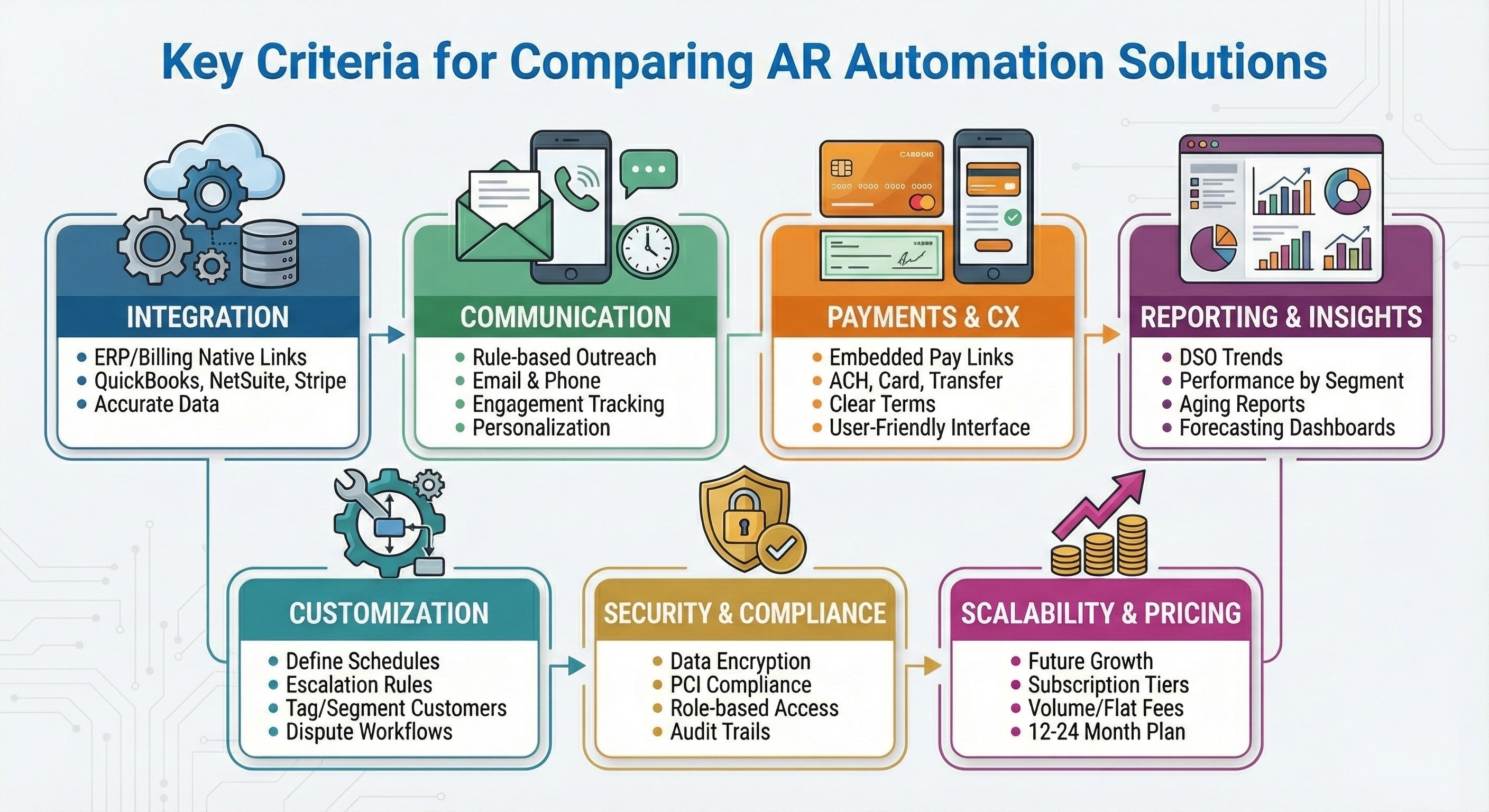
Here are the most important areas to consider when evaluating AR software. Each of these contributes to how effective the solution will be for your business.
Integration With Your Financial Systems
One of the first questions to ask is whether the software integrates directly with your existing accounting and billing platforms. If it does not, you may end up doing manual data entry or exporting and importing files, which defeats the purpose of automation.
Look for systems that connect natively with:
Your general ledger or accounting system
Invoicing platforms
Payment processors
For example, integrations with systems such as QuickBooks, NetSuite, FreshBooks, Sage, Microsoft Dynamics, Xero, Stripe, Square Invoices, SAP Business One, Jobber, ServiceTitan, BuildOps, and Bill.com allow AR automation software to pull invoice and customer data directly and update payment status in real time.
Why it matters
Tight integrations ensure your AR data is accurate and reduce lag between invoicing, reconciliation, and collections.
Automated Communication Capabilities
A core function of AR automation is to handle customer outreach. But not all tools are equal in this area. Some simply send static emails while others provide multi-channel communication with logic built in.
Important things to check:
Ability to send follow-ups based on rules you define (for example, before due date, on due date, after due date)
Support for email and phone outreach without manual intervention
Templates that are professional, customizable, and consistent
Tracking and reporting on engagement with reminders
A robust communication engine helps you keep receivables top of mind for your customers without imposing more steps on your team.
Pro tip
Ask whether the solution supports personalization in messaging. Generic outreach can feel impersonal and damage relationships.
Payment Options and Customer Experience
Customers are more likely to pay quickly when paying is easy. Compare solutions based on the payment options they support and how invoices are presented.
Look for:
Online pay links embedded in reminders
Multiple payment methods such as ACH, credit card, and bank transfers
Clear presentation of payment terms and amounts due
User-friendly customer interfaces
Ease of payment can have a direct impact on your days sales outstanding (DSO) by reducing friction for customers.
Reporting, Analytics, and Insights
Automation alone is not enough. You need visibility into how your AR process is performing so you can make informed decisions.
Important reporting features include:
Days sales outstanding trends
Payment performance by customer segment
Aging reports with actionable insights
Forecasting based on historical data
Look for dashboards that your team can access without generating manual reports. Visualization helps finance leaders and business owners spot trends early. Ground your evaluation in the 9 accounts receivable KPIs that actually predict cash.
Customization and Workflow Flexibility
Every business has unique processes. A tool that forces your team into a rigid workflow can be more trouble than it is worth.
Evaluate whether the solution allows you to:
Define reminder schedules that match your terms
Customize escalation rules
Tag or segment customers based on payment history
Create workflows for dispute resolution or special terms
Flexibility ensures that automation works the way your business works, not the other way around.
Security and Data Protection
Financial data is sensitive. AR automation solutions should adhere to industry standards for security and compliance.
Check for:
Encryption of data at rest and in transit
Payment handling through established, secured payment processors
Role-based access controls
Audit trails for communication and payment history
Security features protect your business, your customers, and your reputation.
Scalability and Pricing Structure
A common mistake is choosing a solution based only on current needs and budget. A better approach is to consider how the pricing structure will change as your invoicing volume grows.
Compare:
Subscription tiers and what features are included
Charges based on invoice volume versus flat fees
Additional costs for integrations or add-on modules
Know what you are committing to over 12 to 24 months so you do not outgrow a solution too quickly.
What Trade-Offs Should You Expect?
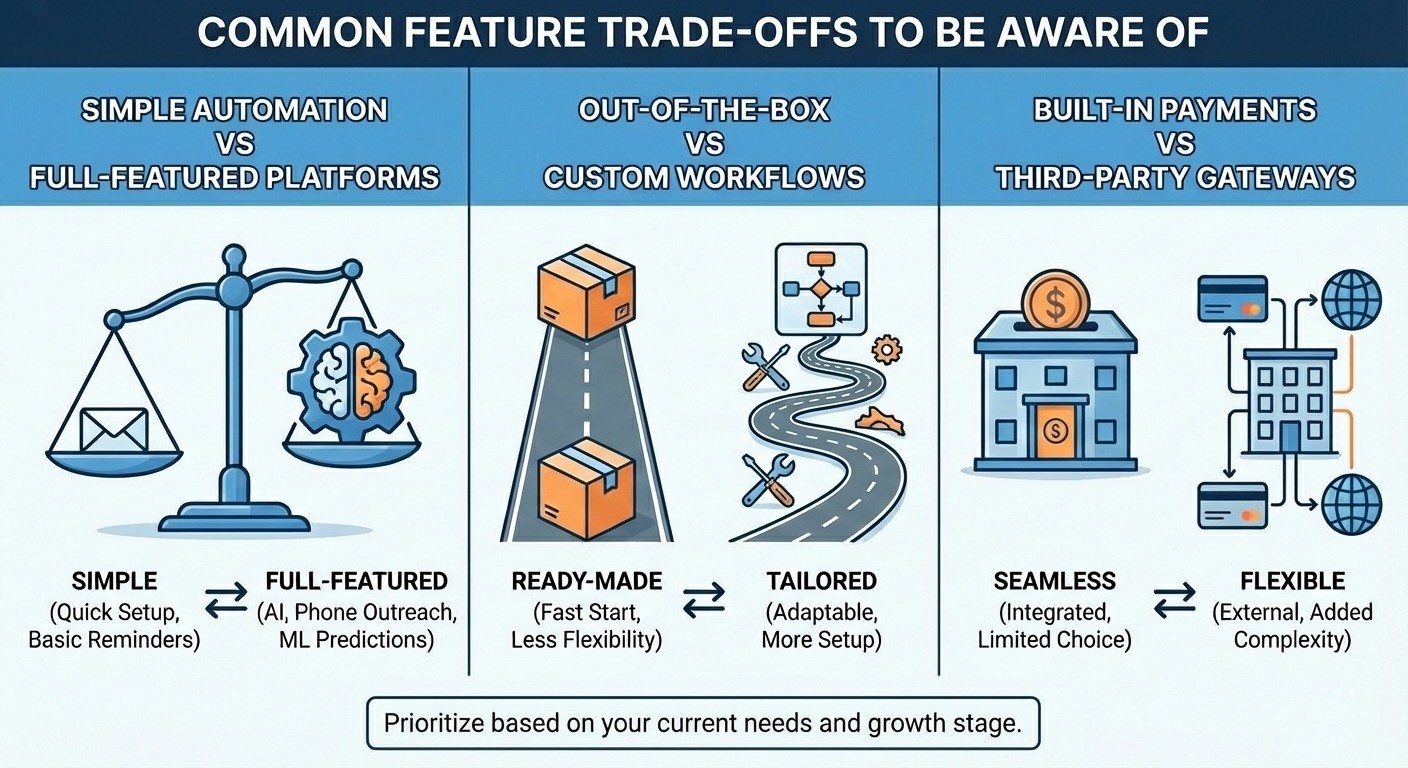
No software is perfect. When comparing solutions, be mindful of trade-offs so you can prioritize features that matter most.
Simple Automation vs Full-Featured Platforms
Some systems are easy to set up but offer only basic email reminders. Others have advanced capabilities like AI-driven communication, phone outreach, and machine learning-based predictions. Decide whether you value simplicity or depth at this stage in your growth. For named vendors and where each fits, see our best AI A/R software roundup.
Out-of-the-Box vs Custom Workflows
Ready-made workflows help you get started quickly, but if they cannot be adapted to your business, they can create friction. Ensure the solution lets you tailor processes where needed.
Built-In Payments vs Third-Party Payment Gateways
Some platforms include payment processing while others require external gateways. Built-in options can be more seamless but may limit your choices. Third-party gateways offer flexibility but add complexity in setup.
How Do You Actually Evaluate AR Automation Options?
Here is a simple process you can follow to make your evaluation more systematic and effective.
1. List Your Requirements
Start by documenting what your business needs:
Required integrations
Desired communication features
Reporting needs
Volume of invoices per month
Budget constraints
This becomes your checklist when reviewing vendors.
2. Shortlist Candidates
Use your checklist to narrow down the field to three to five tools that meet your baseline requirements. Focus on reputable vendors with positive reviews and case studies in service industries similar to yours.
3. Request Demos With Specific Scenarios
A generic demo will not show you how a system works for your use cases. Ask vendors to walk through scenarios such as:
Sending automatic reminders for overdue invoices
Embedding pay links for multiple payment options
Running an aging report and exporting data
Handling a customer dispute
Seeing these workflows in action gives you better insight into usability and fit.
4. Test Integrations
Make sure the solution connects with your accounting and billing systems in a way that makes sense. If possible, pilot the integration with a subset of data to ensure accuracy and synchronization behave as expected.
5. Compare Total Cost of Ownership
Look beyond sticker price. Consider:
Setup fees
Monthly or annual subscription
Costs per invoice or user
Additional charges for premium features
Understanding total costs helps prevent surprises.
6. Gather Feedback From Your Team
AR automation affects multiple roles. Ask your accounting and customer success teams what they think after seeing demos or pilots. Their input can reveal priorities you may not have considered.
What Results Should SMBs Expect from AR Automation?
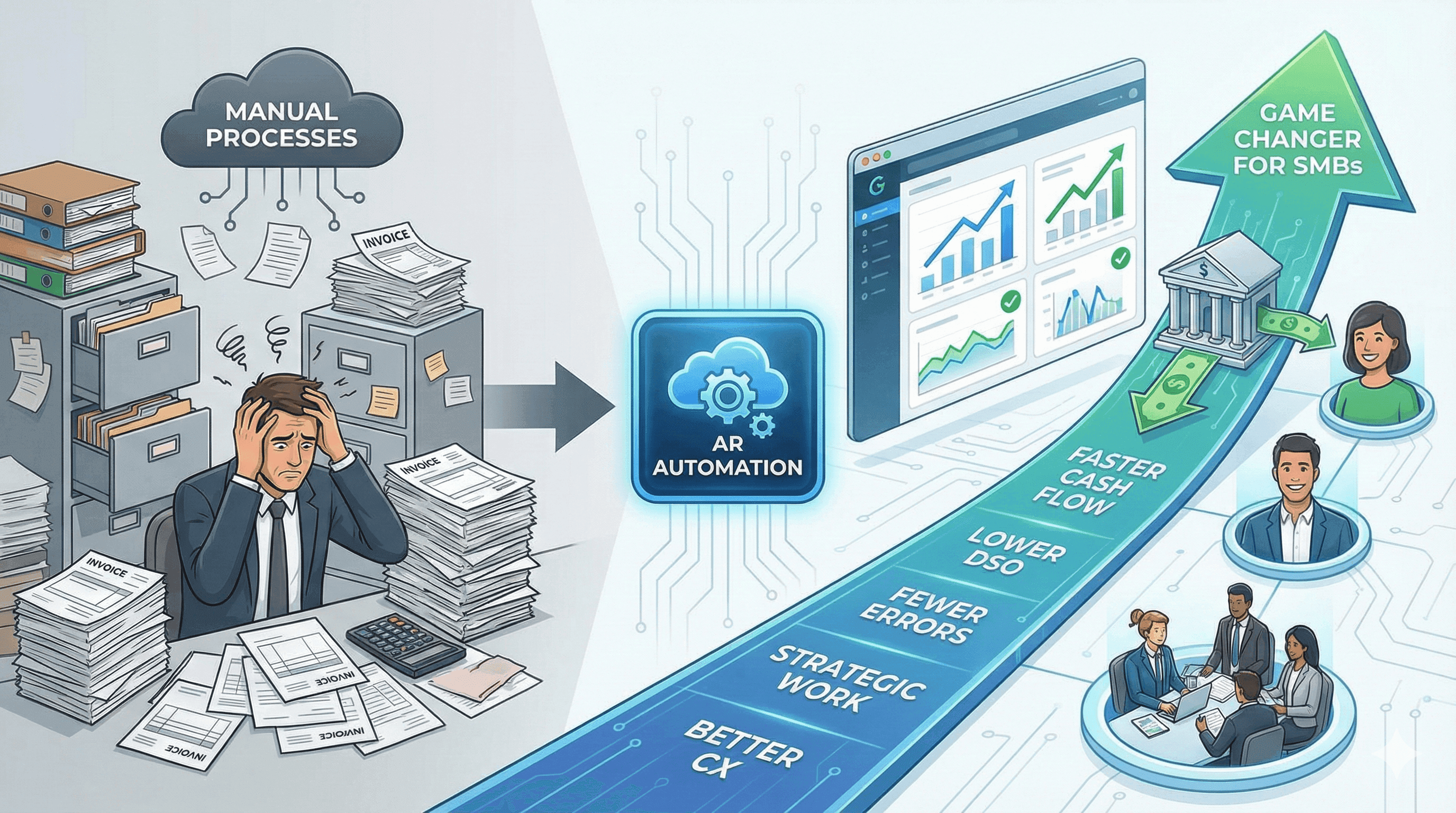
Accounts receivable automation is especially valuable for service-based small and mid-sized businesses that deal with high invoice volumes and recurring billing issues. Comparisons of AR solutions reveal that the right tool not only speeds up collections but also improves accuracy, visibility, and customer experience.
For many businesses, automation leads to:
How Much of Collections Can Automation Actually Handle?
The real dividing line between tools is not features, it is autonomy. Reminder tools send the emails and stop there, leaving the phone calls, disputes, and judgment calls to your team, so the headcount problem never actually goes away. Autonomous platforms work the whole ledger end to end and escalate only the exceptions. Abivo’s benchmark: 86% of collections runs autonomously while 14% routes to humans, and the AI handles 20x a human employee’s workload. One trades client recovered $842,518 in four months and cut DSO by more than 30 days, going from four collectors to one. When you compare vendors, ask each one what percentage of accounts gets resolved with zero human touches, and how they prove it.
Faster cash flow and lower DSO
Fewer manual errors and missed follow-ups
More time for strategic work in finance teams
Better customer communication and professionalism
But these benefits only materialize if you choose a solution that fits your existing systems and future goals.
How Abivo Fits Into Your Evaluation
One solution worth considering is Abivo, an accounts receivable automation platform built for service businesses and SMBs. Abivo connects directly to systems like QuickBooks, NetSuite, FreshBooks, Sage Invoicing, Microsoft Dynamics, Xero, Stripe, Square Invoices, SAP Business One / Ariba, Jobber, ServiceTitan, BuildOps, and Bill.com, bringing AR data and communication workflows together.
With Abivo you get:
Automated reminders via AI calling agents and email
Customizable follow-up schedules to match your terms
Support for modern payment options that make it easier for customers to pay on time
Real-time visibility into your receivables performance
If you are weighing AI collections software for a team rather than a single person, see collections software for AR teams with 3 or more collectors.
Frequently Asked Questions
What is AR automation software?
AR automation software handles invoicing follow-up, payment reminders, and collections outreach automatically, syncing with your accounting system so invoices get chased without manual work.
What should I look for when comparing AR automation solutions?
Seven criteria: native integrations, outreach autonomy across email and phone, payment options, reporting depth, workflow flexibility, security, and total cost of ownership over 12 to 24 months.
How is AI-powered AR automation different from invoice reminder software?
Reminder software sends scheduled emails. AI-powered platforms also make calls, handle replies, negotiate payment timing, and escalate exceptions, which is why they can resolve most accounts with no human touch.
How long does AR automation take to implement?
It depends on integration depth. Direct accounting integrations deploy fastest; Abivo customers are typically live in under a week.
Does AR automation hurt customer relationships?
It is the most common concern, and in practice polite, consistent reminders do not damage relationships. Good platforms escalate to a human the moment a customer pushes back.
This combination of integration, communication automation, and workflow flexibility helps reduce manual work while improving your likelihood of getting paid faster.
When you evaluate AR solutions, include Abivo in your shortlist and test how its features align with your specific needs.
Practical Takeaways
Define your must-have requirements before comparing solutions so you stay focused.
Prioritize integration with your existing accounting and billing systems for accurate, real-time data.
Evaluate automation capabilities based on your communication needs with customers.
Consider payment options and how they affect your customers ability to pay quickly.
Test demos with real use cases to see how each system handles your workflows.
Compare total cost of ownership and scalability before making a commitment.
Choosing the right accounts receivable automation solution will help you recover revenue faster, give your team back hours of manual work, and provide a clearer picture of your financial health. With a thoughtful evaluation grounded in your business priorities, you can make a confident decision that drives results.
Ready to compare AR automation against your current collections process? Get Started.
Curious what this sounds like in practice? Here’s a 98-second sample call: https://abivo.ai/#live-demo